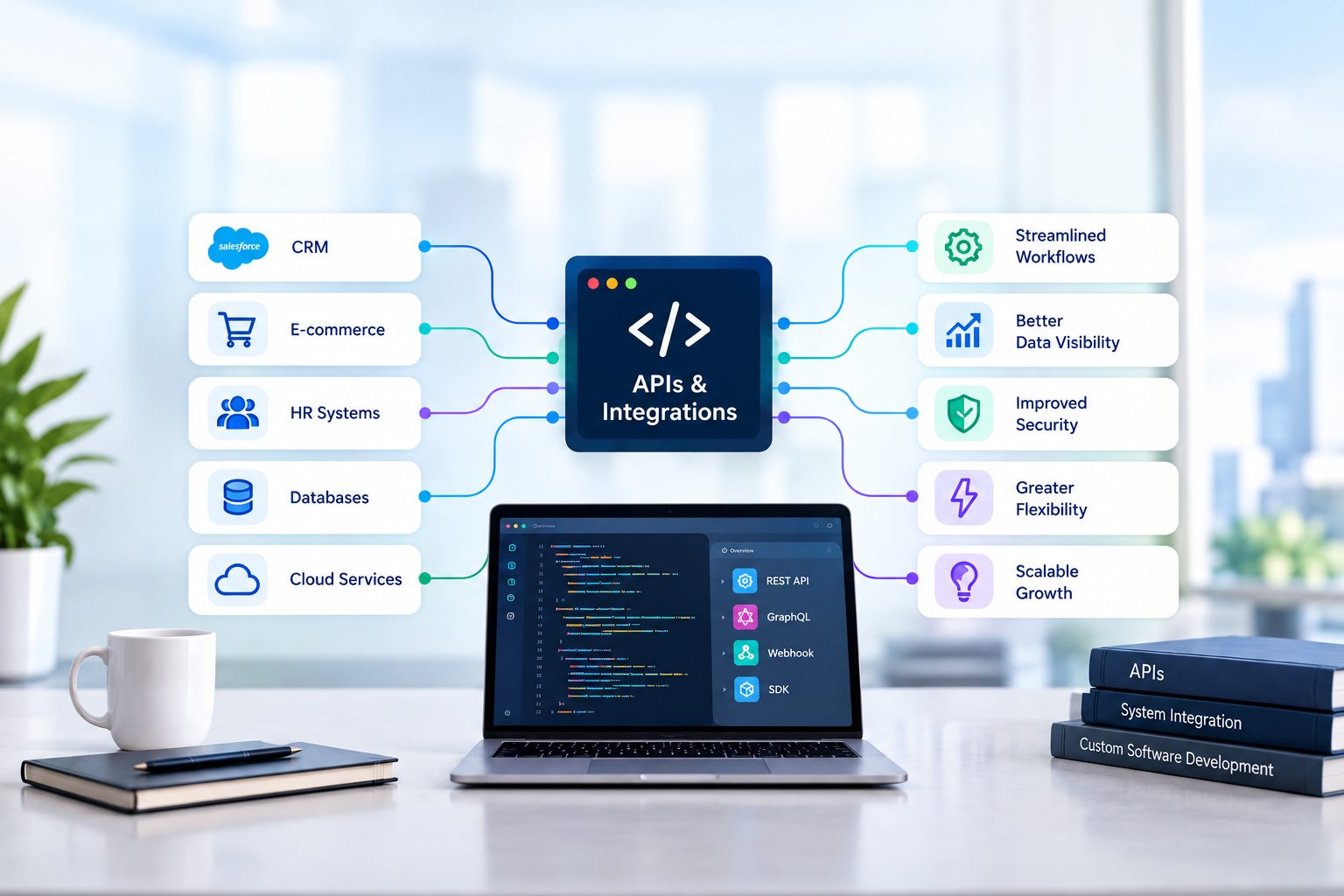
Artificial intelligence tools are now embedded in nearly every layer of modern software. But the convenience of calling a cloud AI API comes with a hidden complexity: costs can compound silently, invisibly, and at scale. This guide distills our company's mandatory precautions into a practical, team-ready reference that every developer, product manager, and stakeholder should bookmark and audit against quarterly.
Why AI Costs Spiral Out of Control
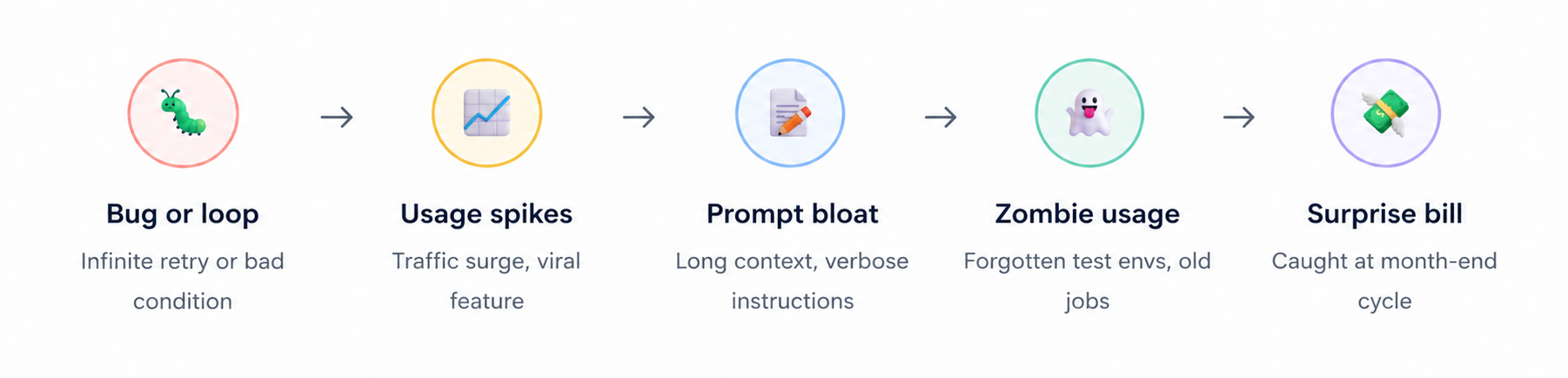
Before diving into controls, it is worth understanding the mechanics of how AI costs grow. Unlike a traditional database query or a REST API call with flat pricing, AI billing is deeply variable and often non-intuitive. Several compounding factors work together to create the conditions for surprise invoices.
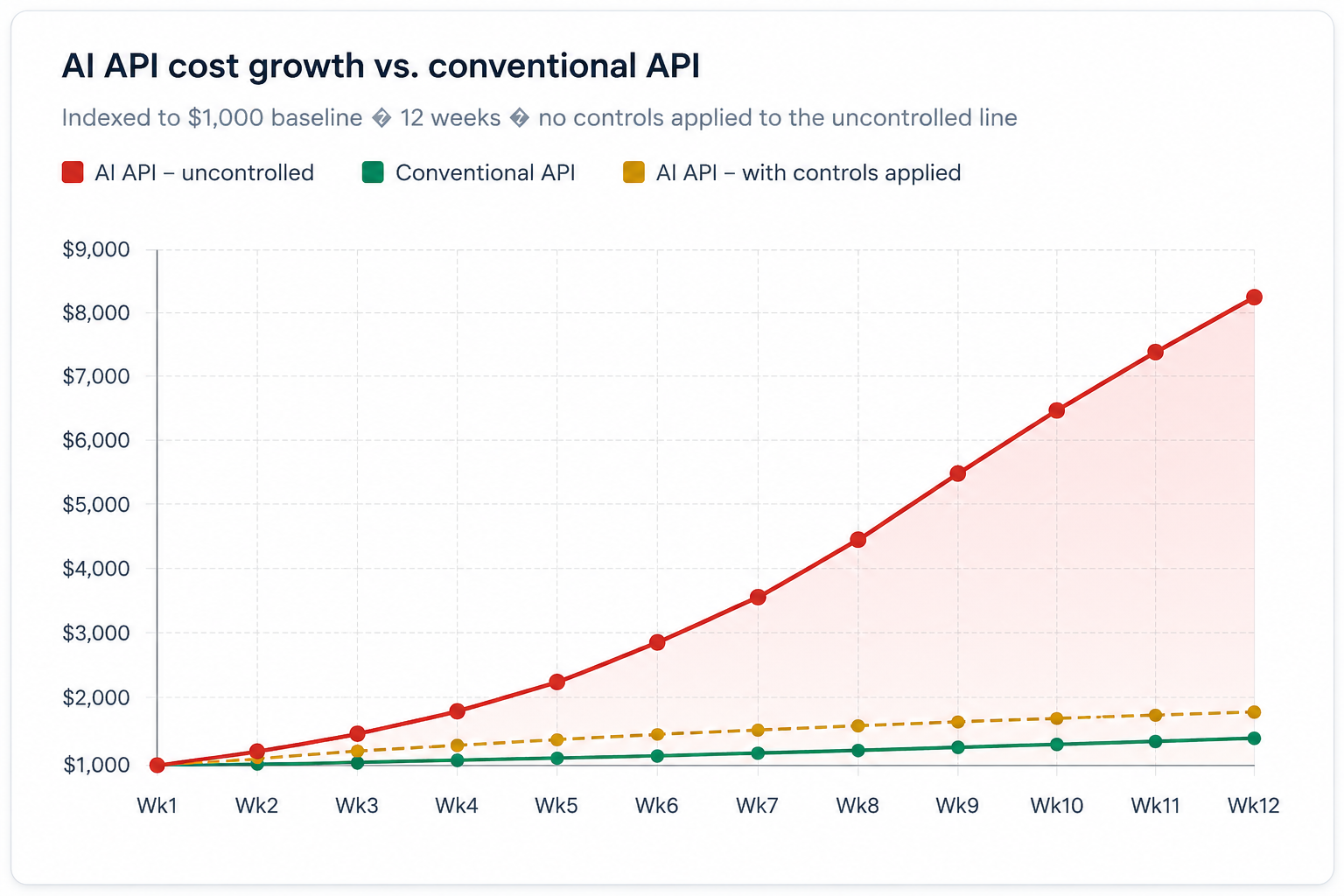
The chart below illustrates how AI API costs typically scale compared to a
conventional API over a three-month ramp period. The difference in slope
reflects token-based pricing, model tier mismatches, and the absence of
caching all controllable factors.
Set Hard Spending Limits. Non-Negotiable.
The single most important protection you can put in place is a hard monthly spending cap configured at the provider dashboard level. This is not a soft goal or an alert threshold, it is a circuit breaker. When the cap is hit, the API stops accepting requests. No code change, no incident response, no escalation required: the billing simply halts.
🚨 Mandatory rule: No AI API integration goes to production without a hard spend cap configured at the provider level. This applies to all environments - staging, pre-prod, and production. If your team cannot demonstrate a cap exists, the deployment is blocked.
Why does this matter so much? Because AI APIs have no built-in rate limits tied to cost by default. An infinite-loop bug that would saturate a conventional API in seconds and fail gracefully can silently rack up thousands of dollars of AI charges before anyone notices - often not until the billing cycle closes.
How to Configure Limits on Each Major Platform
ChatGPT — OpenAI
- Log in → click profile → Billing
- Under Usage Limits, set a Monthly Budget
- Configure an optional email alert threshold (soft limit)
- OpenAI stops all requests automatically at the hard limit
- Limit resets on your billing cycle date — plan accordingly
Claude — Anthropic
- Log in → navigate to Plans & Billing
- Set a Monthly Spend Limit in billing section
- API access stops automatically when cap is reached
- Configure email notifications before hitting the cap
- Review usage breakdowns by model and feature weekly
Gemini — Google AI Studio
- Open Plan & Billing → Monthly spend cap
- Click Edit spend cap and set your max (e.g. $20)
- API returns 429/403 immediately upon breach
- For Vertex AI: enable billing programmatic notifications
- Or link a budget alert to disable APIs via Cloud Functions
Understand and Monitor Token Consumption
Every dollar you spend on an AI API is ultimately a function of tokens - the smallest units of text that models process. Most providers charge separately for input tokens (what you send) and output tokens (what the model returns). Output tokens are consistently priced 2–5× higher than input tokens, which means verbosity in your responses is disproportionately expensive.
Token pricing across major models
| Model | Input per 1M tokens | Output per 1M tokens | Context window | Best for | Cost tier |
|---|---|---|---|---|---|
| GPT-4o | $2.50 | $10.00 | 128K | Complex reasoning, vision | Premium |
| GPT-4o Mini | $0.15 | $0.60 | 128K | Classification, summaries | Budget |
| Claude Opus | $15.00 | $75.00 | 200K | Deep research, long docs | Premium |
| Claude Sonnet | $3.00 | $15.00 | 200K | Balanced everyday tasks | Mid-tier |
| Claude Haiku | $0.80 | $4.00 | 200K | High-volume, fast tasks | Budget |
| Gemini 1.5 Pro | $3.50 | $10.50 | 1M | Long-context analysis | Mid-tier |
| Gemini 1.5 Flash | $0.075 | $0.30 | 1M | Speed-critical pipelines | Budget |
Pricing disclaimer: Figures above are indicative and based on publicly available pricing at the time of writing. AI model pricing changes frequently. Always refer to the official vendor pricing pages openai.com/pricing, anthropic.com/pricing, and ai.google.dev/pricing before making any budgeting or architectural decisions.
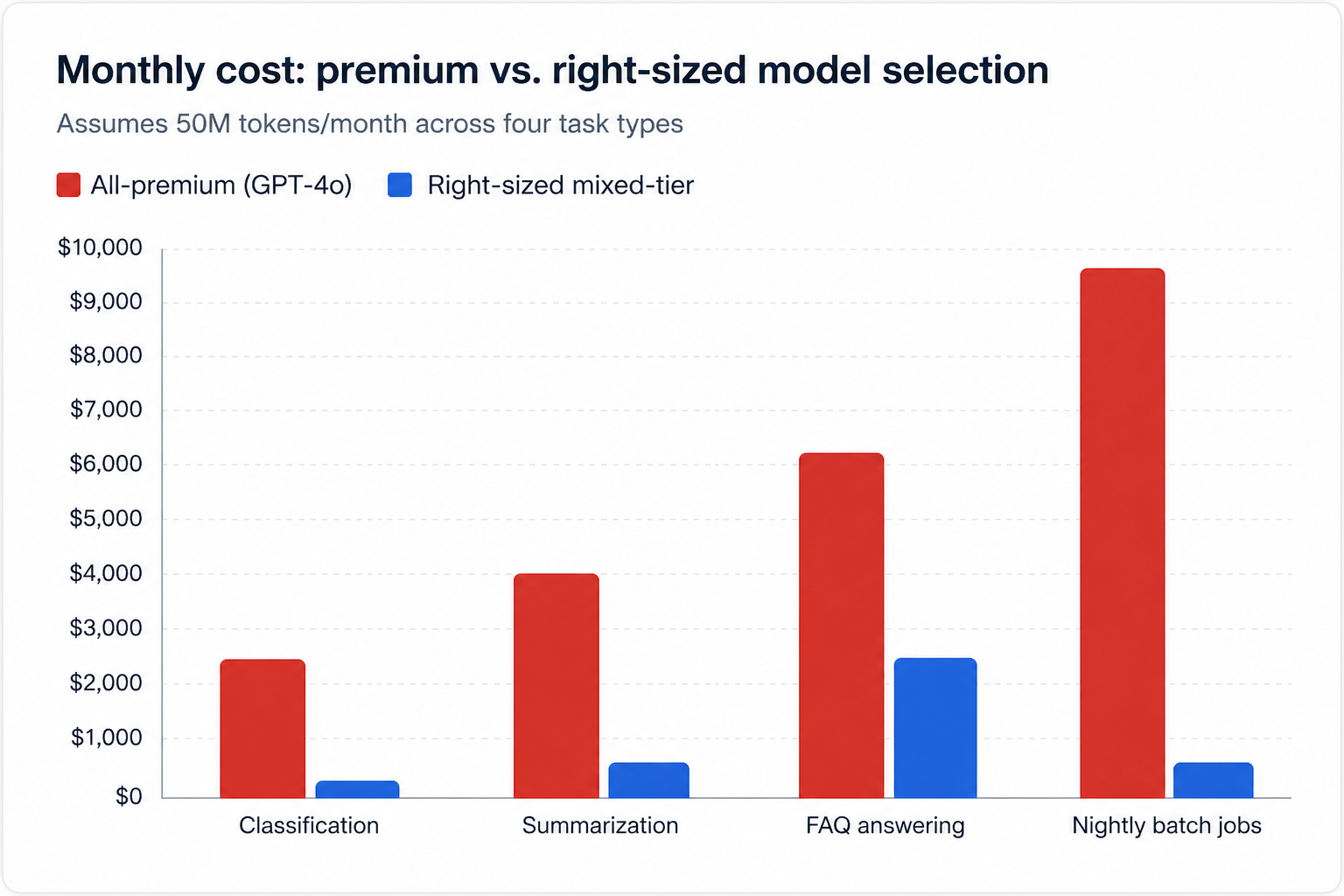
The chart below compares the monthly cost of using an all-premium model versus a right-sized mixed-tier approach across four common task types, assuming 50 million tokens per month.
Choose the Right Model. Every Time.
Model selection is the highest-impact cost lever available to any engineering team. The instinct to reach for the most capable model "just in case" is understandable, but it is also one of the most expensive habits a team can develop. Establish a clear decision framework that engineers apply before choosing any model.
ℹ️ Decision framework: Start with the cheapest model that could plausibly do the job. Run it. Evaluate output quality with a rubric. Only upgrade to a more expensive model when you have evidence not intuition that quality is insufficient. Document the decision and the evidence.
Task-to-model mapping guide
| Task type | Recommended tier | Reasoning | Saving vs. premium |
|---|---|---|---|
| Text classification | Budget | Simple, well-scoped, deterministic outputs | ~90% |
| Short summarization | Budget | Low creativity required, factual output | ~85% |
| Customer FAQ answering | Mid-tier | Needs fluency but not frontier reasoning | ~60% |
| Code generation (simple) | Mid-tier | Well-defined specs, limited ambiguity | ~55% |
| Long document analysis | Premium | Large context, nuanced judgment required | Baseline |
| Complex multi-step reasoning | Premium | High error cost, deep logic chains | Baseline |
| Nightly batch reports | Budget + Batch | Non-real-time, high volume — batch pricing | ~92% |
Six Operational Controls Your Team Must Implement
Spending caps and model selection are first-order controls. The following six practices form the operational layer , the day-to-day engineering discipline that keeps costs predictable as your usage scales. These are mandatory for all teams building on AI APIs.
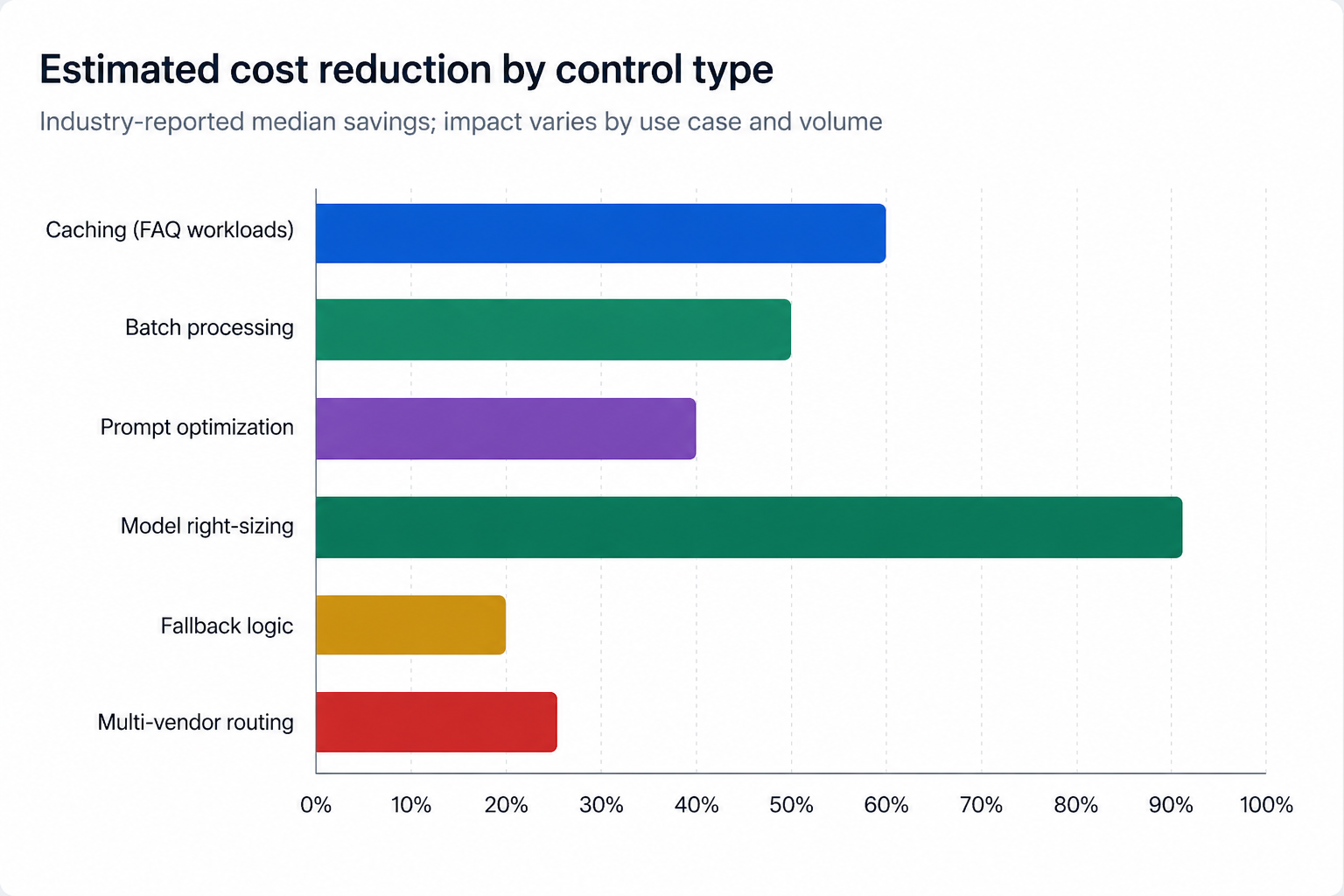
01 . Cache responses where possible. Store and reuse responses to identical or near-identical queries. Use semantic similarity matching (cosine similarity on embeddings) to catch paraphrased duplicates, not just exact matches. Redis with a 24-hour TTL is sufficient for most FAQ and product-description workloads. Typical impact: 20–60% reduction in API calls for FAQ-heavy applications.
02 . Implement rate limiting at multiple layers. Apply rate limits at the user level (prevent abuse), the feature level (cap any one feature's consumption), and the system level (global circuit breaker). Use a token bucket algorithm rather than a fixed window to handle bursts gracefully. Typical impact: eliminates runaway usage scenarios entirely when correctly configured.
03 . Use batching for non-real-time tasks. Group multiple requests and submit them as a batch instead of firing them individually. Anthropic's Batch API, OpenAI's batch endpoint, and Gemini batch inference all offer significant discounts , typically 40–50% below real-time pricing. Typical impact: 40–50% cost reduction for nightly jobs and bulk processing.
04 . Implement fallback logic. When a premium model call fails, times out, or returns an error, your system should automatically fall back to a cheaper model or a deterministic rule-based response not retry the expensive call. Define fallback chains per feature and test them explicitly in your CI pipeline. Typical impact: protects budget during outages; reduces retry-related cost spikes.
05 . Optimize prompts systematically. Verbose prompts are expensive prompts. Audit your system prompts monthly. Remove redundant instructions, consolidate context, and test shorter variants against a quality rubric. Prompt compression tools like LLMLingua can automatically reduce prompt length by 3–5× with minimal quality loss. Typical impact: 15–40% token reduction on high-volume features.
06 . Avoid single-vendor lock-in. Build your AI layer behind an abstraction interface that supports multiple providers. When a vendor raises prices or deprecates a model, you can switch within hours rather than months. A unified client library (LiteLLM, LangChain, or a custom adapter) is the most pragmatic pattern. Typical impact: 10–25% cost reduction through competitive routing and negotiation.
The chart below shows the estimated cost reduction achievable by each of the six controls above, based on industry-reported median savings.
API Key Security Is Financial Control, Not Just Engineering
An exposed or carelessly shared API key is not merely a security incident , it is a billing emergency. Anyone who possesses your API key can charge your account. Keys stolen through public GitHub commits, Slack messages, or environment variable leaks have generated bills exceeding $50,000 before the account holder was notified. Treat API key management with the same rigour as your corporate credit card numbers.
⚠️ Critical: Scan every repository — public and private for accidentally committed API keys before this guide is published internally. Tools like truffleHog, git-secrets, and GitHub's built-in secret scanning can identify historical commits. Rotate any key found, regardless of when it was committed.
- Grant API key access only to authorized developers and services; apply the principle of least privilege at the key level, not just the role level.
- Never commit API keys to source control — not even in private repositories, not even temporarily.
- Use environment-level secrets management: AWS Secrets Manager, HashiCorp Vault, Azure Key Vault, or equivalent.
- Rotate keys on a quarterly schedule and immediately upon any team member departure or suspected exposure.
- Create separate keys per environment (dev, staging, prod) so a staging key breach cannot affect production billing.
- Enable IP allowlisting where supported to restrict which servers can use each key.
- Configure usage-based alerts per key so anomalous consumption triggers immediate notification.
- Audit and revoke keys from departed team members and decommissioned integrations within 24 hours of offboarding.
Log Every AI Call. Without Exception.
You cannot optimise what you cannot see. Detailed, structured logging of every AI API call is the foundation of cost management. Without it, cost reviews are guesswork, debugging is slow, and accountability across teams is impossible. This is not optional instrumentation — it is a deployment requirement.
What every log entry must contain
| Field | Why it matters |
|---|---|
| timestamp | Correlate with incidents, identify time-of-day patterns |
| request_id | Trace a specific call end-to-end through your stack |
| user_id / service_id | Attribute cost to the team or feature responsible |
| model | Track which models are being used and their relative costs |
| input_tokens | Identify prompt bloat and prompt regression over time |
| output_tokens | Track output verbosity; output costs 2–5× more than input |
| estimated_cost_usd | Real-time cost tracking without waiting for the monthly invoice |
| latency_ms | Identify degraded responses; correlate performance with model choice |
| feature_tag | Break down costs by product feature for engineering decisions |
| cache_hit | Measure caching effectiveness; identify misses worth investigating |
Audit and Kill Zombie Usage
Over the lifetime of any active AI product, a graveyard accumulates: forgotten test environments still polling the API, deprecated integrations that nobody decommissioned, background jobs whose business purpose evaporated months ago. These "zombie" calls make no noise, appear in no dashboard, and serve no user — they simply drain budget until someone looks for them.
"In our last quarterly audit, we identified seven distinct zombie integrations collectively consuming $2,800/month in AI API calls. None had been touched in over four months. None appeared in any team's feature roadmap."
Schedule a quarterly zombie audit. For each active API key, pull the last 90 days of call logs and map every request to a live, documented feature. Any calls that cannot be mapped to a current feature are candidates for termination. Require the owning team to justify continued usage within five business days or the key access is revoked.
Governance: Contracts, Reviews, and Pricing Vigilance
Monitor pricing changes proactively. AI pricing evolves rapidly. All major providers have reduced prices multiple times as competition has intensified, but they have also introduced new pricing tiers, changed context window pricing, and deprecated models on short notice. Assign one person per team to subscribe to vendor changelogs and review updates monthly. A 30% price cut you missed is a 30% cost increase you paid unnecessarily.
Review enterprise contracts with procurement. For enterprise AI agreements, legal and procurement must be involved before signature. Pay close attention to four clauses in particular: overage charges (the rate applied once you exceed committed usage), minimum usage commitments (the floor you pay even if you use less), model deprecation timelines, and SLA penalty and credit terms. Getting these wrong can turn a favourable headline price into an unfavourable total cost of ownership.
Conduct regular cost reviews. Schedule monthly reviews of total AI spend broken down by team, feature, and model. The objective is not just to find waste, it is to ask whether AI is delivering proportional business value in each area of investment.
Avoid over-engineering. Custom fine-tuned models, elaborate retrieval-augmented-generation pipelines, and multi-agent orchestration frameworks are powerful and expensive. In the majority of real-world use cases, a carefully engineered prompt against a general-purpose model outperforms a complex custom pipeline when total cost of ownership is accounted for. Validate the simplest solution first. Build complexity only when simplicity demonstrably fails.
Set Up Multi-Threshold Cost Alerts
A single alert at 100% of budget is too late. Configure a four-threshold alert system that gives your team graduated warning and time to respond at each escalation level.
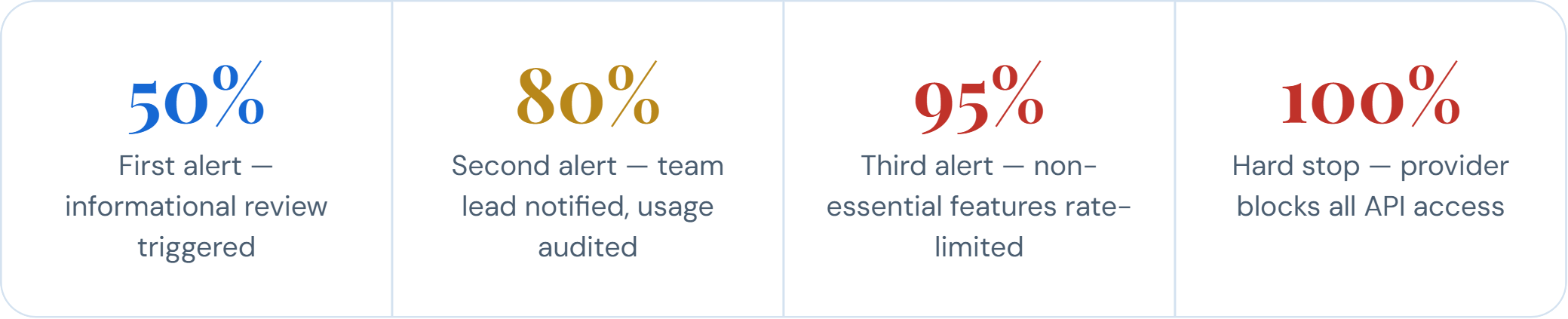
Most major AI providers natively support webhook-based or email-based threshold alerts. Use these wherever available. For platforms that do not, build a lightweight monitoring job that polls your usage endpoint daily and fires alerts through your existing alerting infrastructure (PagerDuty, Opsgenie, Slack).
The Bottom Line
AI APIs are the most powerful and most variable cost surface in modern software. A single mismanaged deployment can generate a month's worth of expected charges in a single afternoon. The practices in this guide hard spending caps, model selection discipline, prompt optimization, response caching, rate limiting, structured logging, regular audits, and multi-threshold alerts are not optional enhancements. They are our company's standard of responsible AI usage.
Every team shipping AI-powered features is expected to implement and maintain these controls. Cost management is an engineering responsibility, not just a finance responsibility. The engineers who write the code that calls the API are best positioned to optimise it and are accountable for doing so.
If you identify a gap in our current controls, or discover a usage pattern that this guide does not address, escalate it. The cost of prevention is always lower than the cost of a surprise invoice.
Author

Saurabh Sharma

VP of Engineering
VP of Engineering at Closeloop, a seasoned technology guru and a rational individual, who we call the captain of the Closeloop team. He writes about technology, software tools, trends, and everything in between. He is brilliant at the coding game and a go-to person for software strategy and development. He is proactive, analytical, and responsible. Besides accomplishing his duties, you can find him conversing with people, sharing ideas, and solving puzzles.
Stay abreast of what's trending in the world of technology
When Standard NetSuite Workflows Fall Short: Implementation, Integration, and Customization...
NetSuite is one of the most capable cloud ERP platforms available, but no out-of-the-box...

From Business Bottlenecks to Digital Products: How to Evaluate Software Development Partners in the...
Every growing business eventually hits a wall. Spreadsheets multiply, teams re-enter the same...

The Hidden Cost of Disconnected Logistics Systems: A Software Architecture Approach to End-to-End...
A shipment leaves the warehouse on time, yet the customer calls twice asking where it is....

The Role of APIs and Integrations in Modern Custom Software Development
No application works alone anymore. Your CRM talks to your billing tool, your mobile app...